Changelog · what’s new

Write into the night.

சொல்வெளி — the open field of words.

Neight is a small, calm text editor for writers and social-media authors who just want a blank page that gets out of the way. Built for Tamil and English on macOS and Windows. No accounts, no telemetry, no AI looking over your shoulder.

* Other Indian and non-English scripts paired with English should work too — only Tamil + English has been tested end-to-end.

* Both store builds above are the recommended, stable installs — they update themselves and need no security prompts. Unsigned developer builds are under Direct Download.

// Important

Neight is for PC and Mac only. This app does not run on iPhone, Android, or any other mobile phone or tablet. The download links above are for macOS and Windows desktop computers only.

$0
Totally free. Forever.
No tiers, no upgrades, no “Pro” version, no subscription, no ads. MIT licensed — yours to use, copy, fork, and ship inside your own work.
// Tamil Typing

Tamil typing works only with the built-in keyboard layouts that ship with Windows 11 and macOS — such as Tamil 99 or Tamil Phonetic on Windows, or the Tamil layout in macOS Keyboard Settings. Third-party Tamil input apps like NHM Writer and Azhagi are not supported and will not work correctly with Neight.

// Privacy at a glance
0 data collected 0 accounts to make 0 trackers or analytics 0 AI in the app 0 ads, ever
Read the privacy policy →
// neight on windows · the blank page
Neight editor on Windows with a clean, blank document.
What is Neight

A notepad built for writing. Nothing else.

Most text editors are built for coders. Most word processors feel like they were built for scientists and big offices — full of toolbars, ribbons, and settings most people never touch. Neight is for everyone in between — the blog post, the Twitter thread, the short story, the column, the lecture notes. The kind of writing that happens in plain text, in a single window, late at night.

Its Tamil name is சொல்வெளிsolveḷi — literally “the open field of words.” That’s the feeling we’re after: a wide, quiet field with nothing on it but you and what you’re trying to say.

Neight is free. Not free with an asterisk, not free-during-a-trial, not free-if-you-sign-up. It’s released under the MIT license — you can use it, share it, fork it, ship it inside your own work, no permission needed. There are no paid tiers and there is nothing to upgrade to.

Free forever Open source · MIT No sign-in No AI in the loop Your text never leaves your device
How it got its name

Neight is just N·8.

It started life as a slightly clunky working title and shed letters until it sounded right.

NotepadEnhanced NotepadE N8 Neight.

The Tamil name is சொல்வெளிsolveḷi — from சொல் (word) + வெளி (open space, field, expanse). It’s the name of the writer’s mode inside the app, and the spirit of the whole thing.

// How to pronounce it

Neight
/neɪt/ — rhymes with eight.

N + eight — that’s it. Say the letter N, then say the number 8. Run them together. Neight.

Install

Direct downloads. Three minutes.

Straight from GitHub — pick your platform. There is no installer wizard, no account, no setup. Just an app you double-click.

These are unsigned developer builds — the newest build, published the moment it is made, with no review step and no version history. Most people want a store build instead: Mac App Store or Microsoft Store. Those install, update and uninstall themselves, with no Gatekeeper or SmartScreen step.

macOS
macOS 15 Sequoia or later · Apple Silicon (arm64) · unsigned latest build
  1. Click the download button below — you’ll get a zip with Neight.app inside.
  2. Double-click the zip to unpack it. macOS will leave a Neight.app next to it.
  3. Drag Neight.app into your Applications folder.
  4. Right-click (or Control-click) Neight and choose Open, then Open again in the dialog. Double-clicking will not work the first time. After that, launch it normally.
Why the extra step? This download is unsigned, so macOS Gatekeeper blocks it until you open it once by right-clicking. The Mac App Store version has no such step and updates itself — it is the recommended install for most people. The macOS download is Apple Silicon (arm64) only.
↓ Download Neight.app arm64 · unsigned · latest build
Windows
Windows 10 or 11 · 64-bit · unsigned latest build, no installer needed
  1. Click the download button below to get Neight.exe. Save it anywhere — Desktop, Documents, a USB stick — whatever you prefer.
  2. Double-click Neight.exe to run it. No installer, no admin rights, no registry edits.
  3. If Windows SmartScreen pops up, click More info, then Run anyway. This is normal for small independent apps that haven’t been signed yet.
  4. Optional — right-click Neight.exe and choose Pin to taskbar or Create shortcut to keep it handy.
Open With integration. This direct download isn’t registered with Windows, so Neight won’t appear in File Explorer’s right-click Open With menu. The Microsoft Store version registers .txt, .md and .markdown for you, from the 2026.081 update onward.
↓ Download Neight.exe unsigned · latest build
// What’s new
Every change, newest first, in the changelog.
The changelog is the live record — every fix and feature as it lands, tagged by platform. The direct downloads above are built straight from it, so they run ahead of the versions in the app stores, which go through review first.
Read the changelog →
How to use

If you’ve used Notepad, you already know how.

Neight opens to a blank page. Type. Save with Ctrl + S. That’s the whole tutorial. The rest is shortcuts you discover as you need them.

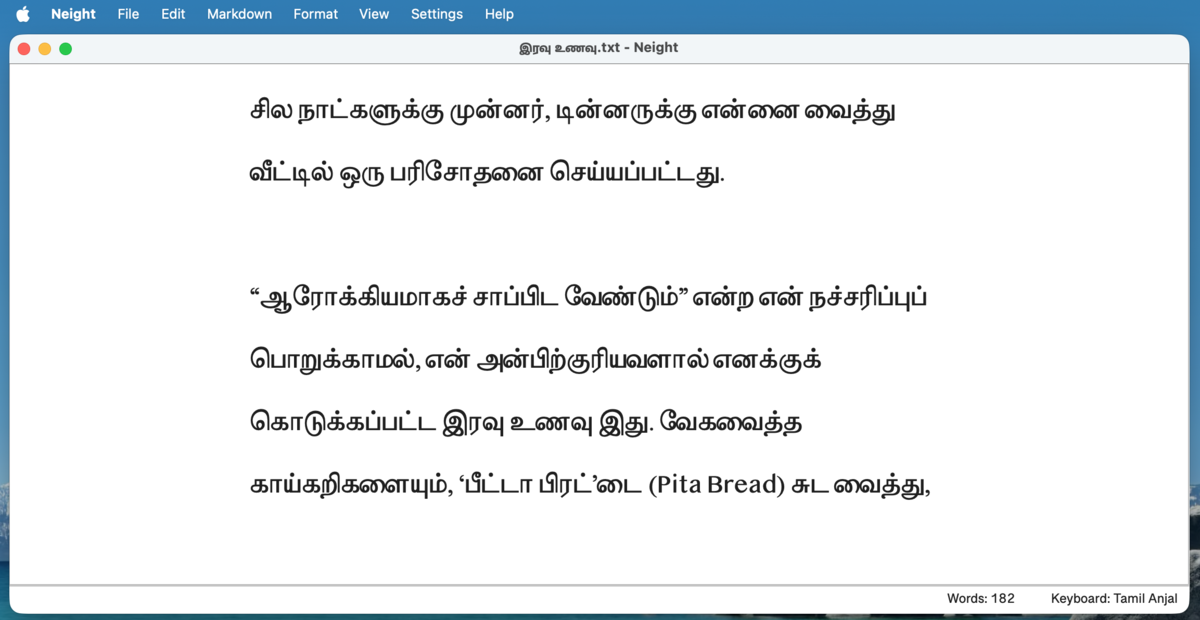
Neight Writer Mode on macOS
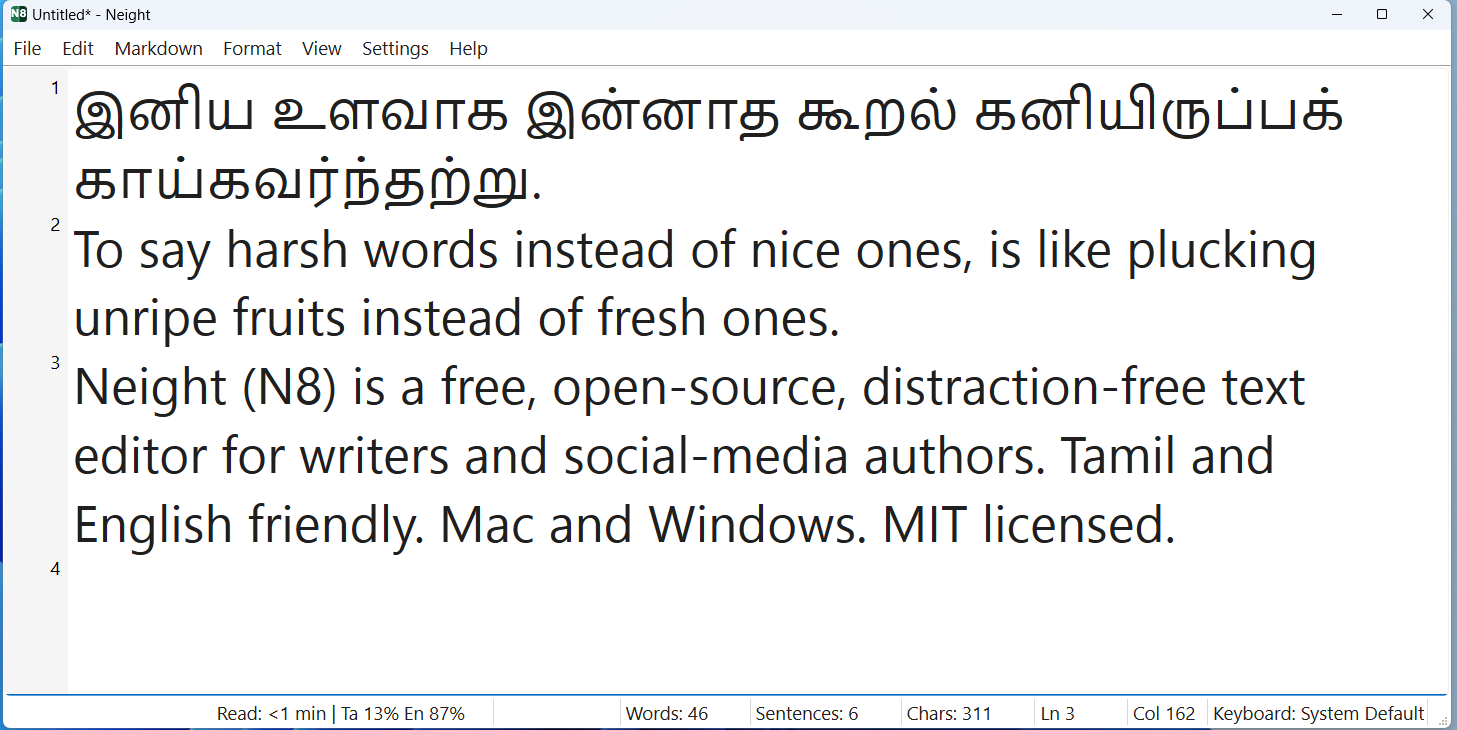
Writer Mode — large Tamil serif, generous spacing, minimal chrome. Made for prose.macOS
Neight editor showing Markdown content
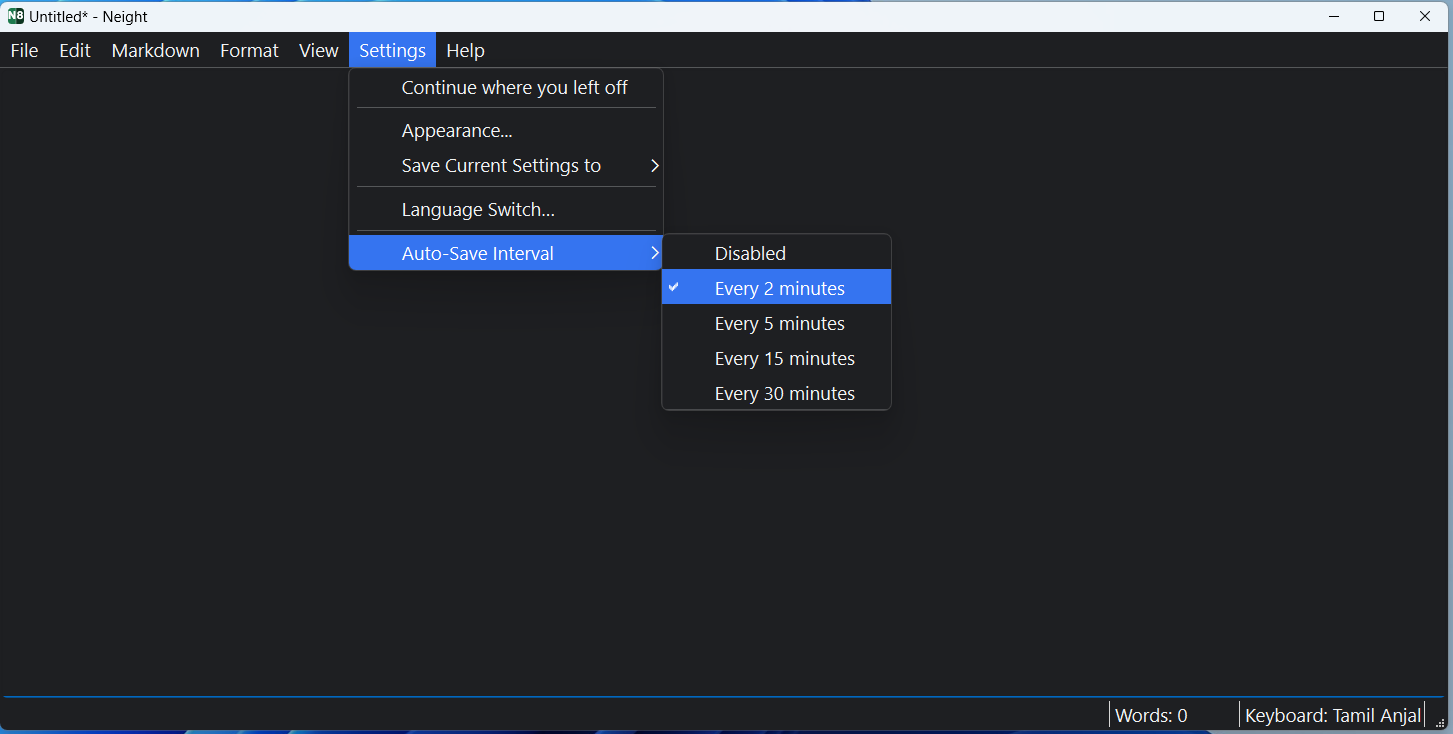
Auto-save runs in the background — pick 2, 5, 15 or 30 minutes.Windows
Neight with line numbers and gutter
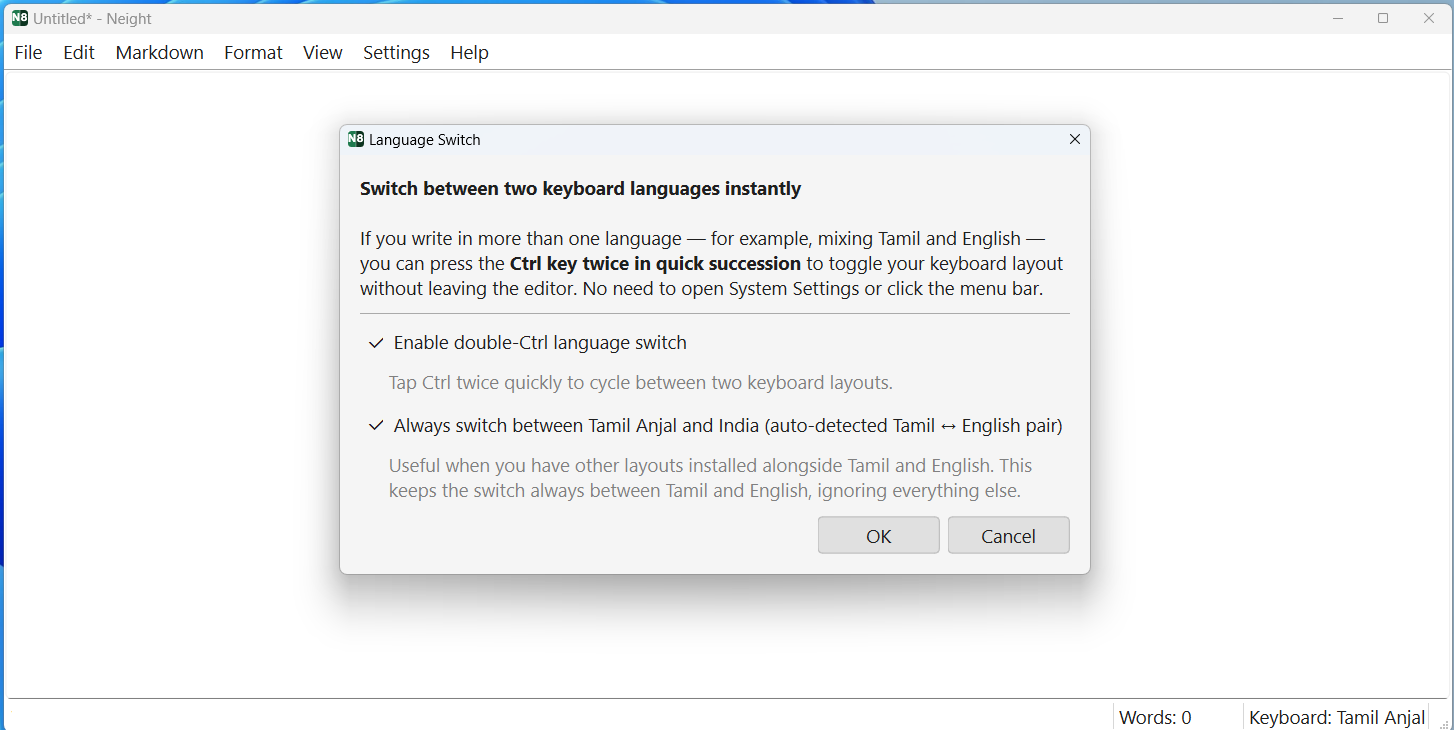
Keyboard Settings — pick which two layouts the double-Ctrl flip toggles between.Windows
Help menu showing Writer and Techie modes on macOS
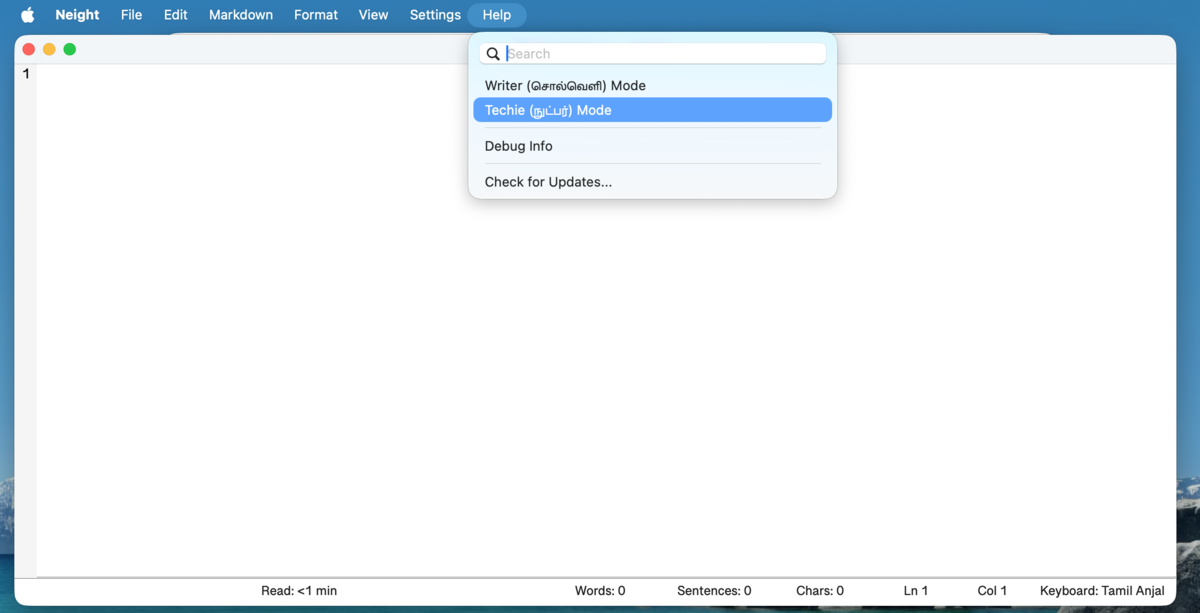
One click in the Help menu flips between Writer Mode and Techie Mode.macOS
What it does

Small features. Sharp ones.

Everything you’d expect from a notepad, plus a careful set of writer-first touches. Nothing more.

01

Two writing modes

One click for Writer Mode — large Tamil serif, generous spacing, calm margins. One click for Techie Mode — compact font, gutter line numbers, full status bar.

02

Tamil + English, side by side

Double-press Ctrl (or ⌃ Control on Mac) and the keyboard flips. No System Settings, no menu hunt. Just write. Works only with the built-in keyboard layouts that ship with Windows 11 and macOS — not with third-party input apps like NHM Writer or Azhagi.

03

Markdown, with a live preview

Headings, bold, italic, lists, links, tables, code blocks — all under one Markdown menu. Open a .md file and see it rendered side by side as you write, with a divider you can drag and Neight remembers.

Ctrl + 1…6 Ctrl + Shift + M
04

Auto-save & recovery

Auto-saves every 2, 5, 15 or 30 minutes. If you start typing before naming a file, a recovery copy is kept quietly in ~/Documents/Neight/ — or, in the Mac App Store version, inside the app’s sandbox container. File → View Recovery Folder always opens the right one.

05

Smart filenames

Press Ctrl + S on an unsaved draft and the save dialog opens pre-filled with the first few words of your text. Accept it or edit it.

06

Find & replace, properly

Includes escape sequences — \n, \t, hex bytes, Unicode codepoints. Click the button for the cheat sheet.

07

Sorkuvai lookup

Right-click any Tamil word to look it up in the Sorkuvai dictionary. Helpful when a word is on the tip of your tongue.

08

Triple-click to Google

Triple-click any word and your default browser opens a Google search for it. Press Ctrl + E on any selection for the same.

09

Export to PDF

A4 layout, real margins, your chosen font. Headings and tables render properly when exporting from Markdown.

10

Pick up where you left off

Neight reopens your last file at startup, cursor in roughly the right place. Toggle it off if you’d rather always start blank.

11

Quiet status bar

Word count, sentence count, character count, reading time, line/column, keyboard layout. Hide what you don’t want from View → Status Bar. Select a passage and the counters switch to it — Words: 42 of 1240 — then revert when you click away.

12

Word index overlay

Number every word in your document — the “butter paper” effect. A translucent sheet for precise editorial annotation.

Ctrl + Shift + W
Why it exists

Built by a writer, for writers.

Neight started because Tamil text wasn’t rendering right in newer Windows Notepad, and the alternatives were either too heavy, too cluttered, or just not suited to quick bilingual writing.

The goal was simple: a small, dependable editor that feels close to Notepad, but works better for the way real writing actually happens — switching languages mid-sentence, drafting in Markdown, exporting a clean PDF, recovering when the laptop dies.

Neight is a personal project, vibe-coded with AI assistance over evenings and weekends. That means a lot of the code was scaffolded in conversation with an AI pair, then read, edited, tested, and shipped by a human. The AI never touches your text — it helped build the app, it doesn’t run inside the app. Your text never leaves your device.

Neight is especially useful if you want a simple editor for short and medium-form writing, better support for Tamil + English workflows, or a Markdown-capable editor without a cluttered toolbar — instead of reaching for a full IDE or a word processor.

FAQ

Quick questions.

The things people ask before downloading.

Will Neight work on Intel Macs?
Not today. The macOS build is Apple Silicon (arm64) only. If you’re on an Intel Mac, the Windows build runs fine under Parallels or similar, or you can build from source — but there isn’t a ready-to-run Intel binary.
Does it work offline?
Yes, always. Every editing feature works with no connection at all, and your text never leaves your device. Neight makes no automatic network requests — it never checks for updates or contacts any server on its own. It touches the internet only when you ask it to: clicking a Markdown link, doing a Google search on a selection, or opening Help → Neight on GitHub. Pull the network cable and everything else works exactly the same.
Does it support other Indian languages? Hindi, Bengali, Malayalam…
It should. Neight uses standard Unicode input and rendering, and the language-switch shortcut works with any two keyboard layouts you have installed on your system. Only Tamil + English has been tested end-to-end, so other scripts may have quirks — please file an issue if you find one.
Does it auto-update?
It depends where you got it. Installed from the Microsoft Store or the Mac App Store, updates arrive automatically like any other store app. Installed as a direct download, updating is manual: the app never checks for updates or phones home, so re-download the latest build from the install section above whenever you want a newer one. Help → Neight on GitHub opens the project page.
Where are my files saved?
Wherever you tell it. Neight is a plain text editor — Save opens a normal save dialog and writes the file where you pick. Nothing leaves your machine. The only thing Neight writes on its own is a temporary recovery copy of unsaved drafts to ~/Documents/Neight/, which is cleaned up the moment you save or close. The Mac App Store version is sandboxed and cannot use your real Documents folder, so from 2026.086 it keeps those copies in ~/Library/Application Support/Neight/ instead — use File → View Recovery Folder and it will take you there.
Can I use Neight for commercial writing?
Absolutely. The MIT license places no restrictions on what you do with anything you write in Neight, or with the app itself. Write your novel, your client deliverables, your paid newsletter — it’s all yours.
Is there a Linux build?
Not as a packaged download today. Neight is written in Python with Qt and runs fine on Linux from source — see DEVELOPER.md for build instructions.
How do I uninstall it?
On macOS, drag Neight.app from Applications to the Trash, then optionally remove ~/Library/Application Support/Neight/ and ~/Documents/Neight/. If you installed from the Mac App Store, deleting the app also deletes its sandbox container at ~/Library/Containers/com.murasu.neight/ — which from 2026.086 is where your presets and recovery copies live, so copy anything you want to keep out of File → View Recovery Folder first. On Windows, if you installed from the Microsoft Store, uninstall it from Settings → Apps as usual — that removes the file-type registrations with it. For the direct download, just delete Neight.exe; it makes no registry entries of its own. Settings may remain beside the executable or under %LOCALAPPDATA%\Neight\; presets and recovery files may remain under %USERPROFILE%\Documents\Neight\. Neight uses no installer or service entries.
Does Neight work on iPhone or Android?
No. Neight is a desktop app for PC and Mac only. There is no iOS or Android version, and there are no plans for one. If you are visiting this page on a phone, you will need to download and install Neight on a Windows PC or Mac to use it.
Does Neight work with NHM Writer, Azhagi, or other Tamil input apps?
No. Tamil typing in Neight relies on the built-in keyboard layouts that ship with Windows 11 and macOS — for example, Tamil 99 or Tamil Phonetic on Windows, or the Tamil layout under macOS Keyboard Settings. Third-party Tamil input apps such as NHM Writer and Azhagi are not supported and will not work correctly inside Neight.
Go deeper

More if you’re curious.

Nothing here is required reading. Open whichever one fits where you are.

Acknowledgements

Neight wouldn’t exist without these people.

Pa. Raghavan

// the spark

Editor of MadrasPaper.com, an online Tamil magazine. His years-long search for the perfect distraction-free writing app on macOS was the seed that became this project. That level of care for the craft of writing was reason enough to build something.

Muthu Nedumaran

// encouragement & support

Of Murasu.com. Warm thanks for the encouragement and support throughout. Neight stands on a long history of Tamil computing work that the Murasu community has been quietly doing for decades.

And a quiet thank-you to the kind soul who contributed the Apple Developer signature used for earlier macOS builds.